
The evaluation kit for MAX3845/MAX4814E is an implemented verification board for evaluating MAX3845, a DVI TM/HDMI TM 2:4 TMDS® fanout/buffer, and MAX4814E, a 2:4 low-frequency switch. It is connected to DVI and HDMI cables through Molex DVI and HDMI connectors. The kit features complete 4-output fanout, independent DDC path configuration from each input to any output, support for full 1080p and 1920 x 1200 resolutions, and other characteristics.
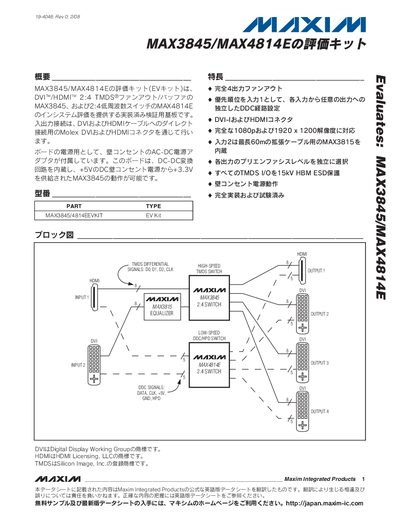
The MAX3845/MAX4814E evaluation kit provides a fully implemented 4‑output fan‑out solution for HDMI/DVI signals, supporting 1080p and 1920 × 1200 resolutions. The board includes built‑in DC‑DC conversion, wall‑outlet AC power operation, and independent DDC configuration for each input.
The manual contains a quick‑start guide, parts list, block and circuit diagrams, layout drawings, and details on ESD protection, pre‑emphasis settings, and switch functions to configure the kit for various test scenarios. This manual is written in Japanese.
| Supported video resolutions | 1080p and 1920 × 1200 |
|---|---|
| ESD protection (MAX3845) | 2 kV |
| ESD protection (MAX3208E) | 15 kV |
| Power supply | 120 V AC wall outlet |
Connect the kit to a 120 V AC wall outlet using the supplied AC‑DC adapter; the board will power up from the wall outlet.
The board includes Molex DVI and HDMI connectors that connect directly to HDMI/DVI cables.
Rotary switches S9 and S10 select DDC signals; S9 routes DDC from input 1 and S10 routes DDC from input 2.