
Key facts
- Brand
- Uniden
- Model
- D1685 Series
- Category
- Telephone
- Industry
- Electronics
- Documents
- 3
- Languages
- EN
- Last added
- 2026-11-10
Start here
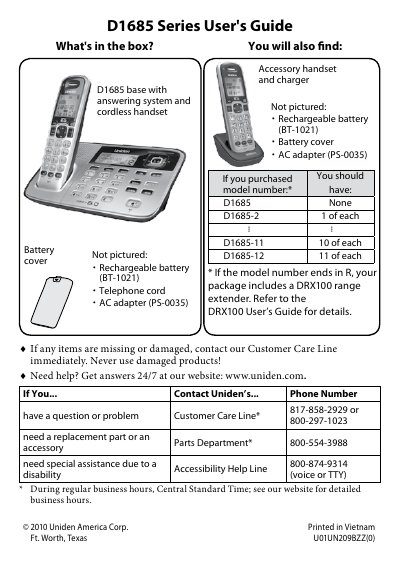
Uniden D1685 Series Cordless Phone with Answering System User's Guide
The D1685 Series User's Guide covers a Uniden base with answering system and cordless handset. The package includes a rechargeable battery (BT-1021), battery cover, AC adapter (PS-0035), and telephone cord; model numbers D1685 through D1685-12 add accessory handsets, and models ending in R include a DRX100 range extender.
The manual explains charging and connecting the phone, testing the connection, changing to pulse dialing, using menus and handset settings, Caller ID and redial lists, call waiting, the phonebook, special features, and the answering system. It also gives troubleshooting, adapter and battery information, compliance information, and warranty details.
Uniden D1685 Series specifications
| Charge time | About 15 hours |
|---|---|
| Power outlet | Regular indoor 120V AC |
| Battery | Rechargeable battery BT-1021 |
| AC adapter | PS-0035 |
| Redial pause | 2 seconds |
Source: Uniden D1685 Series Cordless Phone with Answering System User's Guide
All Uniden D1685 Series documents by type
Day-to-day operation, settings and troubleshooting. Start here if the product is already set up.
Questions answered in these manuals
How long should I charge all handsets before using?
Charge all handsets completely for about 15 hours before using.
From: Uniden D1685 Series Cordless Phone with Answering System User's Guide
How do I change the phone to pulse dialing?
Press MENU/SELECT and choose Global Setup, then select Dial Mode and Pulse.
From: Uniden D1685 Series Cordless Phone with Answering System User's Guide
How do I change the phone to pulse dialing?
Press MENU/SELECT, choose Global Setup, select Dial Mode, then select Pulse.
How do I turn off the ringer?
Press and hold the SILENT key in standby mode to turn off the ringer on the base and any registered handset.
How do I change the dialing mode to pulse?
Press MENU/SELECT, choose Global Setup, select Dial Mode, and choose Pulse.
What does the ECO icon on the display mean?
It indicates that the handset is using ECO (power save) mode.