
Key facts
- Brand
- Nokia
- Model
- RM-5
- Documents
- 4
- Languages
- EN · ZH
- Last added
- 2012-05-09
Start here
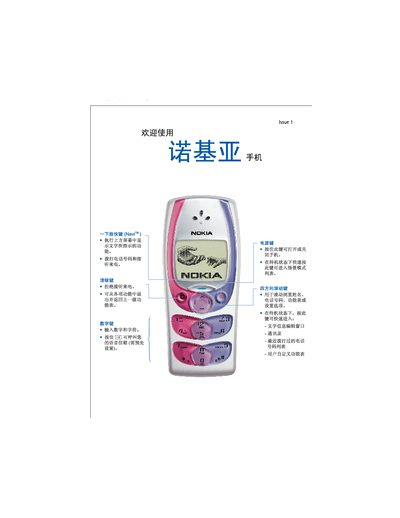
Nokia RM-5 User Manual
This manual covers the basic operation of the Nokia RM-5, including how to power the device on and off, make and receive calls, use the address book, and navigate the menu with the four‑directional scroll key. It also explains the input methods for Chinese and English text, as well as additional functions such as the radio, calculator, and alarm.
Safety information, network service details, approved accessories, battery charging, and maintenance procedures are included. The document also contains warranty terms and instructions for securing personal data. This manual is written in Chinese.
Nokia RM-5 specifications
| Camera | 3.2 MP, 4× digital zoom |
|---|---|
| Network | GSM/EDGE 850/900/1800/1900 |
| Operating System | Series 60 release 5.0 |
| Bluetooth | Bluetooth 2.0 (A2DP/AVRCP) |
| USB Interface | USB 2.0 high‑speed micro‑USB |
| Audio Connector | 3.5 mm Nokia AV connector |
| Talk Time | Up to 4.9 hours |
| Standby Time | Up to 351 hours |
All Nokia RM-5 documents by type
Disassembly, diagnostics and part numbers, for repair.
Day-to-day operation, settings and troubleshooting. Start here if the product is already set up.
Questions answered in these manuals
What network bands does the Nokia 5230 RM‑588 support?
It supports WCDMA HSDPA 900/2100 and EGSM 850/900/1800/1900.
What type of display does the Nokia 5230 have?
It uses a 3.2‑inch TFT display with a 640×360 pixel resolution and up to 16 million colours.
How do I turn the Nokia RM-5 on or off?
Press and hold the power key to turn the phone on or off.
From: Nokia RM-5 User Manual
What safety precautions should I follow when using the phone near fuel?
Do not use the phone at fuel stations or near flammable liquids.
From: Nokia RM-5 User Manual