
Key facts
Start here
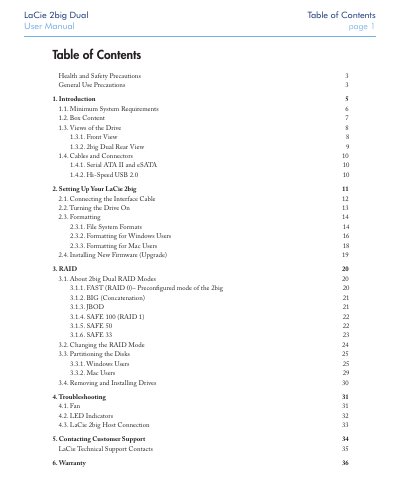
LaCie 2big Dual Hard Drive User Manual
The LaCie 2big Dual is a RAID hard drive subsystem with eSATA II 3Gbits and Hi-Speed USB 2.0 interfaces. According to the manual, it supports six RAID modes: FAST, BIG, JBOD, SAFE 100, SAFE 50, and SAFE 33.
The user manual begins with health and safety precautions and minimum system requirements for Mac and Windows, then covers box contents, drive views, cables and connectors, setup, formatting, and firmware upgrades. It also explains RAID modes and changing them, partitioning disks, removing and installing drives, troubleshooting fan and LED issues, contacting customer support, and warranty information.
LaCie 2big Dual specifications
| Interface | eSATA II 3Gbits and Hi-Speed USB 2.0 |
|---|---|
| RAID modes | FAST, BIG, JBOD, SAFE 100, SAFE 50, SAFE 33 |
| Power requirements | 100-240 V~, 1.5 A, 60-50 Hz |
| Operating temperature | 5° C to 35° C (41° F to 95° F) |
All LaCie 2big Dual documents by type
Day-to-day operation, settings and troubleshooting. Start here if the product is already set up.
Questions answered in these manuals
What RAID modes are available on the LaCie 2big Dual?
The manual lists six RAID modes: FAST, BIG, JBOD, SAFE 100, SAFE 50 and SAFE 33.
What interfaces does the LaCie 2big Dual use?
The drive uses eSATA II 3Gbits and Hi-Speed USB 2.0.
What RAID mode options does the LaCie 2big Dual support?
It supports six RAID configurations: FAST, BIG, JBOD, SAFE 100, SAFE 50 and SAFE 33.
How do I format the drive on a Windows computer?
Use the Windows formatting procedure described in section 2.3.2 of the manual.