
Installation sheet for the UTC Fire & Security SA-DACT dialer, covering operation, wiring, testing, specifications, and compatibility.
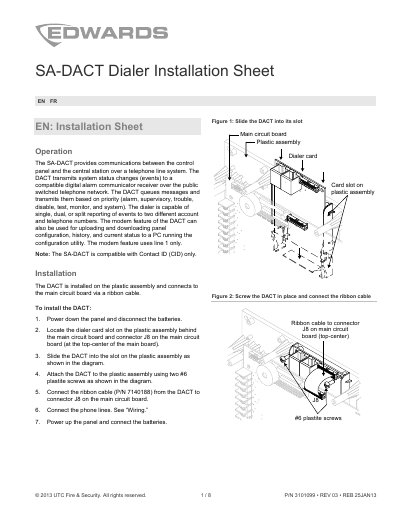
The UTC Fire & Security SA-DACT Dialer Installation Sheet describes how the SA-DACT provides communications between a control panel and a central station over a telephone line system. It explains event reporting, priority queuing, single, dual, or split reporting, and modem use for uploading and downloading panel data to a PC.
The document gives installation steps, wiring instructions for phone lines and an RJ-31X block, dialer test steps, specifications, compatibility information, and FCC and Industry Canada information.
| Phone line type | One or two loop- start lines on a public, switched network |
|---|---|
| Phone line connector | RJ-31/38X (C31/38X) |
| Communication format | Contact ID (SIA DC -05) |
| Operating voltage | 24 VDC |
| Operating current | Standby/Alarm: 41 mA Max.: 100 mA |
| FCC registration number | GESAL01BSADACT |
| Industry Canada registration number | 3944A -SADACT |
| Ringer equivalence number | 0.1B |
| Operating temperature | 32 to 120°F (0 to 49°C) |
| Operating humidity | 0 to 93% RH, noncondensing at 90°F (32°C) |
The steps power down the panel and disconnect the batteries, slide the DACT into the card slot, secure it with two #6 plastite screws, connect the ribbon cable to J8, connect the phone lines, then power up the panel and reconnect the batteries.
Phone line 1 connects to connector J1 and phone line 2 connects to connector J4. The card typically connects to an RJ-31X block using an 8-position, 4-conductor modular cord.
Press the control panel's Menu button, choose Test, choose Dialer, select the account, and press Enter. Press Cancel to return to the previous menu or Menu to exit menu mode.
The SA-DACT is compatible with Contact ID (CID) only. The specifications list Contact ID (SIA DC -05).