
User manual for TC Helicon's GO TWIN audio/MIDI interface, covering setup, operation, specs, and compliance.
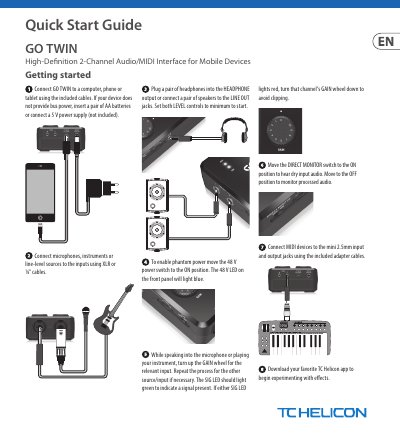
This user manual guides users through connecting and operating the TC Helicon GO TWIN interface with mobile devices or computers. It details input/output connections, gain and phantom power controls, and MIDI setup. The document also includes technical specifications and FCC compliance information.
The interface supports both analog and digital connections, with XLR and 1/4" inputs, headphone and line outputs, and USB connectivity. It includes 2 x AA batteries or a 5V power supply for operation. The manual provides troubleshooting tips for signal clipping and interference issues.
| Microphone Input | 2 x XLR balanced, Impedance approx 2.3 kΩ |
|---|---|
| Instrument Input | 2 x 1/4" TS unbalanced, Impedance approx 470 kΩ |
| Headphone Output | 1 x 1/8" TRS, stereo |
| Line Output | 2 x 1/4" TRS, balanced, Impedance approx 1.5 kΩ |
| A/D – D/A Conversion | 24-bit @ 44.1 kHz, 48 kHz |
| Frequency Response | 20 Hz to 20 kHz, +0.2/-1.2 dB |
| Power Source | USB bus power, DC power supply, battery power |
| Dimensions | 40 x 77 x 128 mm (1.6 x 3.0 x 5.0") |
| Weight | 0.37 kg (0.81 lbs) |
Use USB bus power, a 5V DC power supply, or insert 2 x AA batteries.
Move the 48 V power switch to the ON position; the 48 V LED will light blue.
20 Hz to 20 kHz, with a tolerance of +0.2/-1.2 dB.
Input gain is adjustable from 0 to +47 dB.