
French user manual for PowerWalker S 400/600/800/1000 UPS units, covering installation, connections, display, safety and troubleshooting.
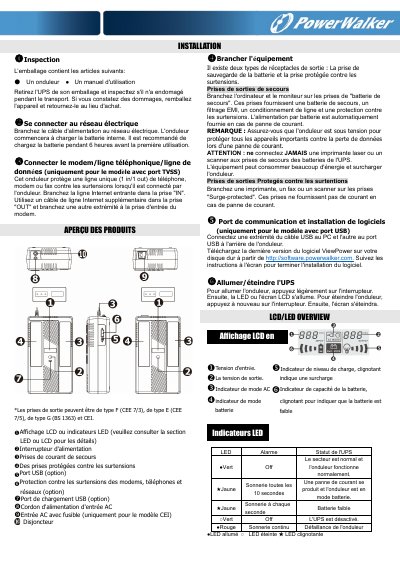
PowerWalker UPS manual in French for S 400, 600, 800 and 1000 VA models. It describes unpacking, mains connection, modem/phone/data line protection, output receptacles, USB communication and software, power switching, LCD/LED indicators and safety precautions.
Specifications list input/output voltage, transfer time, battery type, charging time, dimensions, weight, humidity and noise level. Troubleshooting covers LED/LCD not lighting, battery mode, continuous alarm, short backup time and overload. This manual is written in French.
| Capacity | 400VA/240W, 600VA/360W, 800VA/480W, 1KVA/600W |
|---|---|
| Input voltage | 230 VAC |
| Input voltage range | 170-280 VAC |
| Output voltage regulation | ±10% (battery mode) |
| Transfer time | Typical 6 ms, 10 ms max |
| Output waveform | Simulated sine wave |
| Battery | 12V/4.5Ah x1, 12V/7Ah x1, 12V/9Ah x1 |
| Charging time | 6 to 8 hours to 90% capacity |
| Dimensions | 345 x 200 x 100 mm |
| Net weight | 4.2 to 6.4 kg |
It is recommended to charge the internal battery for 6 hours before first use.
No; never connect a laser printer or scanner to the UPS battery backup outlets.
ViewPower; download the latest version from http://software.powerwalker.com.
Check the error code for more details.