
This document provides usage notes and troubleshooting tips for the NovaStar NovaStudio V3.0 software, covering system requirements, decoder conflicts, and…
This document serves as a set of usage notes for the NovaStar NovaStudio V3.0 software. It outlines critical requirements for the operating environment, specifically regarding CPU frequency and memory, to ensure smooth video playback. It also details potential conflicts with third-party decoder packages and provides instructions for resolving them. This manual is written in Chinese.
| Recommended CPU frequency | 1.8GHz |
|---|---|
| Recommended memory | 1G以上 |
Some decoder packages may cause the software to become unresponsive due to conflicts. It is recommended to ensure the NovaStudio decoding environment and avoid installing various decoder packs.
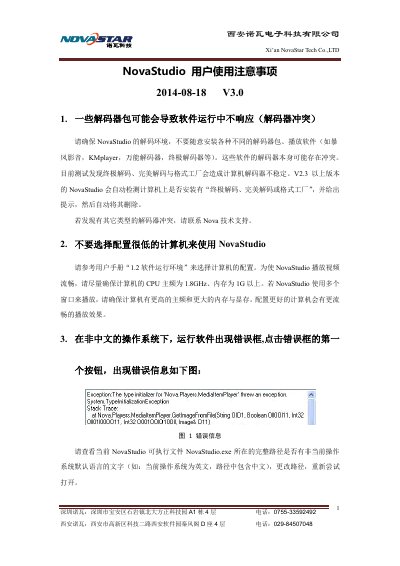
Check if the full path of the NovaStudio.exe file contains non-default language text for the current operating system. If so, change the path and try opening it again.
Ensure that Office (Word, Excel) is installed. If using Excel, add it to the trusted zone in your firewall or antivirus settings. For Word tables with split screens, try moving the table to Excel.
Install the Flash OCX plugin by double-clicking 'install_flash_player_ax.exe' located in the NovaStudio.exe path.