
Connection guide for Mitsubishi FX3U Ethernet HMI communication, covering default controller settings, wiring, address definitions, and protocol options.
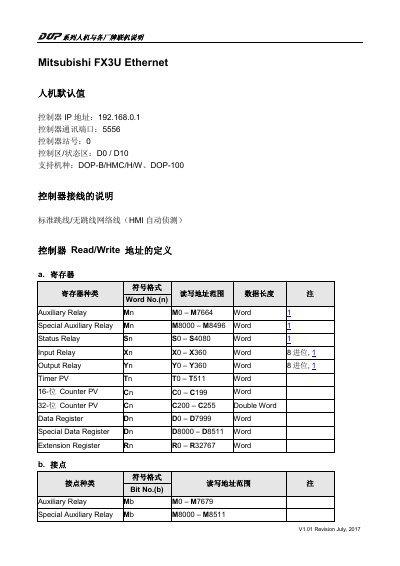
This document explains how Mitsubishi FX3U series HMI panels connect to controllers from different brands. It lists the default controller IP address, communication port, station number, control and status areas, supported HMI models, wiring, and Read/Write address definitions for registers and contacts.
It also describes the two communication protocols available for Mitsubishi FX3U Ethernet connections: MC protocol and MELSOFT protocol. The MELSOFT protocol uses port 5556, while the MC protocol allows a user-defined communication port; detailed port setup is referred to the Mitsubishi FX3U factory manual. This manual is written in Chinese.
| Controller IP address | 192.168.0.1 |
|---|---|
| Controller communication port | 5556 |
| Controller station number | 0 |
| Control area / status area | D0 / D10 |
| Supported HMI models | DOP-B/HMC/H/W, DOP-100 |
| Auxiliary relay register range | M0 – M7664 |
| Special auxiliary relay register range | M8000 – M8496 |
| Status relay register range | S0 – S4080 |
| Input relay register range | X0 – X360 |
| Output relay register range | Y0 – Y360 |
| Timer PV register range | T0 – T511 |
| Counter PV register range | C0 – C199 |
| Double word counter PV register range | C200 – C255 |
| Data register range | D0 – D7999 |
| Special data register range | D8000 – D8511 |
| Extension register range | R0 – R32767 |
| MELSOFT protocol port | 5556 |
The default controller IP address is 192.168.0.1.
The controller provides two protocols for connection over Mitsubishi FX3U Ethernet: MC protocol and MELSOFT protocol.
The MELSOFT protocol always uses communication port 5556, while the MC protocol can use a user-defined port.
Supported models are DOP-B/HMC/H/W and DOP-100.