
MERCURY MW326R Wireless Router Quick Installation Guide

This guide provides quick installation instructions, hardware connection diagrams, and setup steps for the MERCURY MW326R wireless router.
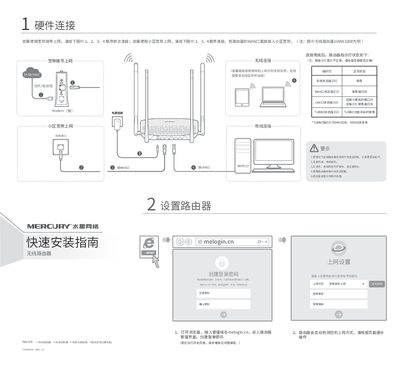

MERCURY MW326R Wireless Router Quick Installation Guide - cover page
Brand
Mercury
Category
Router
Document type
User Manual
Language
Chinese
Pages
2
File format
PDF
File size
659 KB
Published
14 October, 2026
Updated
14 October, 2026
Model
MW326R
MD5 checksum
9683924AC730B79858469AE2D8124E3D

About this manual

This document is a quick installation guide for the MERCURY MW326R wireless router. It details the hardware connection process for both dial-up and broadband internet access, including safety precautions and indicator light status descriptions. The guide also lists the items included in the package. This manual is written in Chinese.

What's inside

  • Hardware Connection
  • Indicator Status
  • Items List
  • Router Setup
  • Wireless Setup
  • Warranty Statement
  • Frequently Asked Questions

Frequently asked questions

How do I restore the router to factory settings?

Hold the RESET button on the back panel until all indicator lights turn on simultaneously, then release it.

What is the warranty period for the power adapter?

The warranty period for the power adapter is 1 year.

Download PDF (659 KB)

More Mercury Manuals


View all Mercury manuals →