
This quick reference guide covers starting and stopping the IDEXX ImageVue CR20 system, requesting image captures via Cornerstone or standalone software…
The document provides instructions for operating the IDEXX ImageVue CR20 Digital Imaging System. It details how to start and shut down the scanner and computer, as well as procedures for requesting image captures from various practice management systems including Cornerstone or standalone setups.
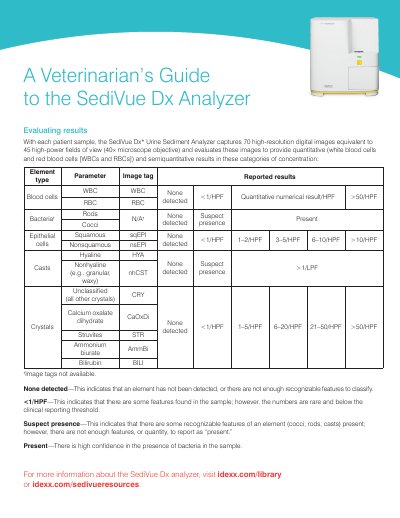
Additionally, the guide explains how to evaluate results generated by the SediVue Dx Urine Sediment Analyzer. It lists quantitative and semiquantitative parameters such as blood cells, bacteria, epithelial cells, casts, and crystals, along with guidance on interpreting result messages like 'Images crowded' or 'Crystalline debris detected'.
The analyzer captures 70 high-resolution digital images equivalent to 45 high-power fields of view.
You should dilute the sample 1:5 with 0.9% normal saline and rerun it.
Viewing the first 3–6 images should provide enough information to arrive at a consensus.