
Operation instructions for i-Tech LCD display OSD buttons, covering menu navigation, image adjustments, color settings, and input signal selection.
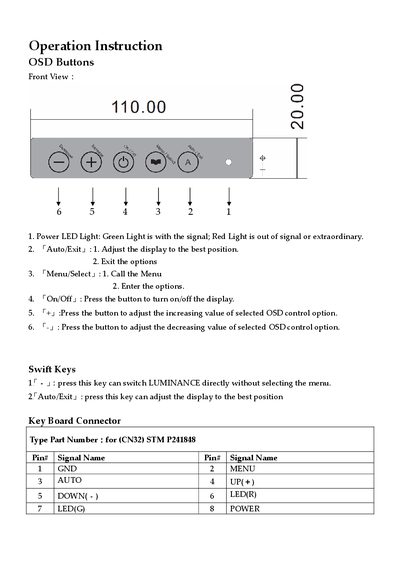
This manual provides operation instructions for the On-Screen Display (OSD) buttons found on the front of an i-Tech LCD display. It details the functions of each button, including Power LED status indicators, Auto/Exit, Menu/Select, On/Off, and adjustment keys (+/-). The guide explains how to navigate the OSD menu structure using these physical controls.
A green light indicates a signal is present, while a red light indicates no signal or an extraordinary condition.
Press the 'Auto/Exit' button to automatically adjust the display settings.
The supported languages include English, French, German, Spanish, Japanese, Traditional Chinese, and Simplified Chinese.
The display supports two types of inputs: D-SUB for analog signals and DVI for digital signals.