
Quick start guide for the Hunter NODE-BT Bluetooth-enabled battery-operated irrigation controller covering battery setup, app pairing, schedules…
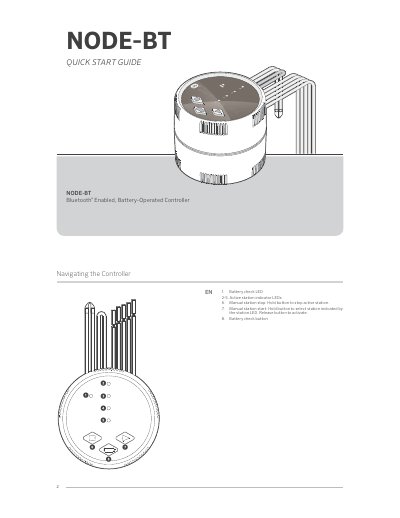
This quick start guide covers the Hunter NODE-BT, a Bluetooth-enabled, battery-operated irrigation controller. It explains the controller buttons and LEDs, battery installation and replacement, and how to download the free Hunter NODE-BT app for iOS or Android devices.
The guide also describes connecting to the controller through the app, setting irrigation schedules, adjusting controller settings, resetting the controller, and troubleshooting common problems. Compliance notices and Bluetooth specifications are included near the end.
| Battery type | One or two 9-volt alkaline batteries |
|---|---|
| Bluetooth frequency band | 2,400 MHz to 2,480 MHz |
| Bluetooth maximum transmit power | Less than 20 dBm EIRP |
| Bluetooth Low Energy maximum power spectral density | Less than 10 dBm/MHz EIRP |
| Irrigation programs | Up to three programs (A, B, or C) |
| Run time range | 1 second to 12 hours |
It uses one or two 9-volt alkaline batteries, with the + position matched to the battery terminals.
Turn on Bluetooth on the smartphone, press the SCAN button, and connect to a NODE-BT controller.
Remove the batteries, wait one minute, then press and hold the Battery Check Button while re-inserting the batteries until the Battery Check LED turns amber.
Up to three programs, labeled A, B, and C, can be used for irrigation.