
HP computer user manual with installation, setup, maintenance, and troubleshooting instructions.
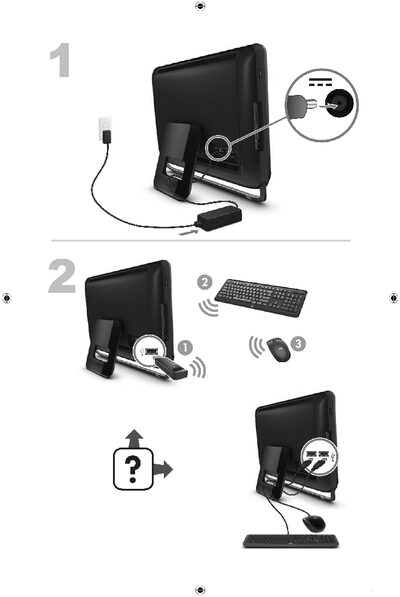
This manual provides step‑by‑step guidance for installing and configuring an HP computer, including safety precautions, power connection, and HDMI setup. It also points users to HP support resources for additional help.
The document covers routine maintenance such as cleaning vents and keyboards, as well as troubleshooting common issues like power failures, display problems, and peripheral errors. Detailed procedures help users resolve these problems safely and efficiently. This manual is written in Chinese.
Use a battery‑powered vacuum to clean the computer’s ventilation openings and wipe the keyboard and mouse with a dry cloth and isopropyl alcohol.
Make sure the power cable is properly connected, check that the power‑indicator LED is lit, and hold the power button until the computer shuts off before restarting.
Connect the HDMI monitor to the graphics card first; this activates the audio output and allows you to adjust the resolution.