
This manual explains the HP Color Laser 150 series printer control panel indicators, wireless setup, and troubleshooting steps.
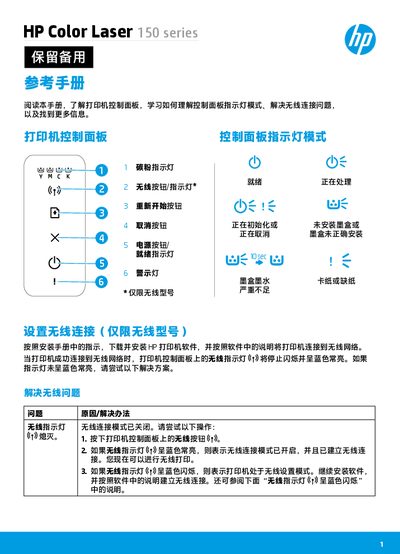
The reference manual describes each control‑panel indicator on the HP Color Laser 150 series printer, including the wireless, ready, warning, and toner‑cartridge lights. It shows how to interpret steady or flashing lights and what actions to take for each condition.\n\nIt also provides detailed procedures for setting up wireless networking, using Wi‑Fi Direct, configuring WPS, and troubleshooting common connectivity problems. Environmental guidelines such as operating temperature and humidity are included at the end of the document. This manual is written in Chinese.
| Operating temperature | 17.5 °C to 25 °C (63.5 °F to 77 °F) |
|---|---|
| Recommended humidity | 30 % to 70 % |
Ensure Wi‑Fi Direct is enabled, then press and hold the Restart button for 10 seconds to display the Wi‑Fi Direct name and password on the printer.