
Short bilingual guide for the Hitron CGN-DP3 covering reset buttons, LED indicators, port connections, and Wi-Fi setup.
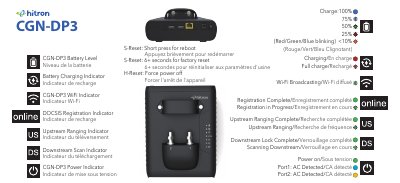
This short bilingual English/French guide covers basic operation of the Hitron CGN-DP3. It explains S-Reset and H-Reset actions, battery and charging indicators, Wi-Fi, DOCSIS registration, upstream ranging, downstream scan, and power LED states.
It also describes Port 1 and Port 2 connections, including terminating Port 2 when it is not in use, and gives initial setup steps: power on the CGN-DP3, then connect to its Wi-Fi using SSID XM2-(last 4 of MAC) and password defaultkey.
| Default Wi-Fi password | defaultkey |
|---|---|
| Wi-Fi SSID format | XM2-(last 4 of MAC) |
| Port 2 | Designed for advanced functions; terminate if not in use |
| Battery level indicators | 100%, 75%, 50%, 25%, and less than 10% |
Short press S-Reset.
Press S-Reset for 6 or more seconds.
Use H-Reset to force power off.
Connect to SSID XM2-(last 4 of MAC) with password defaultkey.