
This quick start guide provides connection and configuration procedures for the Greenspan EC250 electrical conductivity sensor, including power requirements…
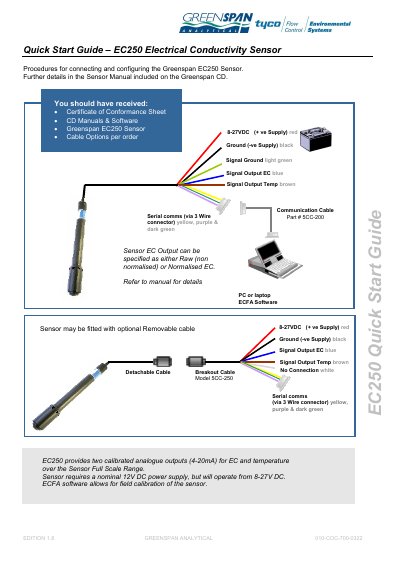
This document is the Quick Start Guide for the Greenspan EC250 Electrical Conductivity Sensor. It outlines the procedures for connecting and configuring the sensor, noting that further details are available in the Sensor Manual included on the Greenspan CD.
The guide specifies that the EC250 provides two calibrated analogue outputs (4-20mA) for electrical conductivity (EC) and temperature. It details the power supply requirements, stating the sensor requires a nominal 12V DC supply but operates from 8-27V DC. Additionally, it describes the ECFA software for field calibration and provides a wiring diagram for the detachable cable breakout, identifying colors for power, signal, and communication lines.
| Power Supply Range | 8 - 27V DC |
|---|---|
| Nominal Power Supply | 12V DC |
| Output Type | 4 - 20mA |
| Measured Parameters | EC and temperature |
The ECFA software allows for field calibration of the sensor.
Yes, the sensor EC output can be specified as either Raw (non normalised) or Normalised EC.