
Basic user guide for the Fanvil X3S IP phone covering setup, dialing, multiple calls, call transfer, and voicemail features.
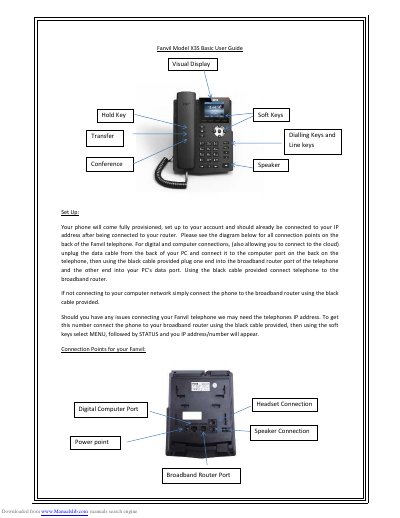
This document serves as a basic user guide for the Fanvil X3S IP telephone. It provides instructions on initial setup, including connecting the device to a broadband router and a computer for cloud access. The guide explains how to retrieve the phone's IP address via the menu system if connection issues arise.
Connect the phone to your broadband router using the black cable provided. Then using the soft keys select MENU, followed by STATUS and your IP address/number will appear.
This device can support up to two concurrent calls.
Press the HOLD button, select the line on hold using the soft keys, then replace the handset.
Access the line where the voicemail was left, then select the PLAY soft key to hear voice mails.