
Basic user guide for the Fanvil X3S IP phone covering setup, calling, hold, transfer, voicemail, and other features.
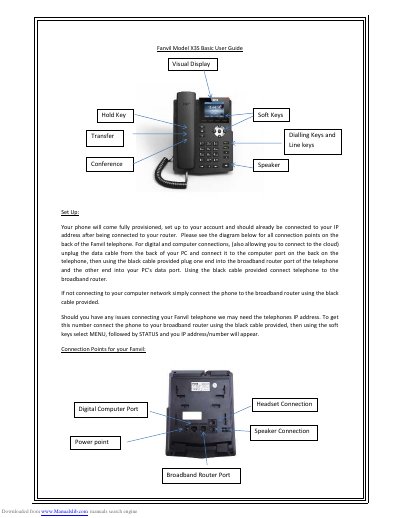
Fanvil X3S IP Phone Basic User Guide describes setup of the phone's connection points, including broadband router, computer, power, headset, and speaker connections. It also explains how to obtain the phone's IP address through the MENU and STATUS soft keys.
Calling features covered include direct dialing, phone book and call log selection, support for up to two concurrent calls, placing calls on hold, attended and unattended transfer, and voicemail recording and retrieval. Other features listed include cloud phone book, group contacts, Do Not Disturb, web portal, desktop connections, and switching between multiple calls.
| Concurrent calls | Up to 2 |
|---|
Connect the phone to the broadband router with the black cable provided, then use the soft keys to select MENU and STATUS; the IP address/number appears.
The device can support up to two concurrent calls.
Place the caller on HOLD, use the CALL TRANSFER soft key and dial the extension number, then hang up.
Access the line where the voicemail was left, then select the PLAY soft key; voicemails can be played on loudspeaker.