
Fanvil PA2S intercom quick installation guide covering port definitions, installation, IP address search, SIP setup, volume, function key, and speaker modes.
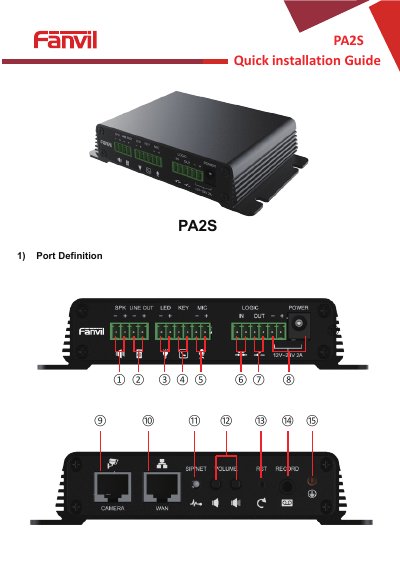
This guide is for the Fanvil PA2S intercom device and explains its port definitions, installation steps, and peripheral connections.
It also covers searching the device IP address, default settings, fast settings for SIP accounts, volume, function keys, and speaker modes with matching power adapters.
| Power input | 12V to 24V, 2A |
|---|---|
| Microphone sensitivity | -38 dB; bias voltage 2.2 V |
| LED port output | 5 V / 5 mA |
| Ethernet port | 10/100 M adaptive, PoE input |
| Speaker output power (4 ohm) | 10 W (PoE or 12 V), 20 W (18 V), 30 W (24 V) |
| Default static IP address | 192.168.1.128 |
| Default web port | 80 |
| Reset | Press and hold for 6 seconds |
| Default DHCP client | Enabled by default |
Press and hold the reset key for 6 seconds; the indicator light turns off and the device restarts and restores factory settings.
The default static IP address is 192.168.1.128.
The default web port is 80.
Connect a speaker and press the volume down key for 3 seconds after 30 seconds of power-on.
The default user and password are both admin.