
Lens selection chart for the EIKI LC-HDT2000 projector, listing lens models, throw distances, shift limits and adapters.
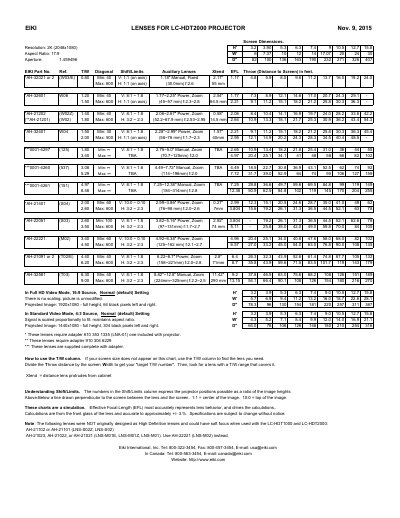
This EIKI document is a lens specification and selection chart for the LC-HDT2000 projector. It lists EIKI part numbers and reference codes for the available lenses, together with their type (manual fixed, manual zoom or power zoom), focal length range, f-number, minimum and maximum screen sizes, shift/limits and the throw distance in feet for each screen width.
Reference tables give screen dimensions for a 2K (2048x1080) 17:9 image, for full HD video mode with a 16:9 source and for standard video mode with a 4:3 source. Notes explain how to use the T/W column to pick a lens when a screen size is not listed, how to read the Shift/Limits column, which lenses need the LNA-01 adapter, and which older lenses were not originally designed as high definition lenses.
| Resolution | 2K (2048x1080) |
|---|---|
| Aspect Ratio | 17:9 |
| Aperture | 1.459496 |
| Screen size range (W03/E and W06 lenses) | Minimum 40, maximum 600 |
| Calculation accuracy | approximately +/- 3% |
The note says AH-21102 or AH-21101 (LNS-S02Z, LNS-S02) and AH-21023, AH-21022 or AH-21021 (LNS-M01E, LNS-M01Z, LNS-M01) were not originally designed as High Definition lenses and could have soft focus with this projector. It recommends using AH-22221 (LNS-M02) instead.
Divide the throw distance by the screen width to get your target T/W number, then look for a lens with a T/W range that covers it.
They express the projector positions possible as a ratio of the image heights above and below a line drawn perpendicular to the screen between the lens and the screen.
The lenses marked with one asterisk require adapter 610 353 1335 (LNA-01), one of which is included with the projector.