
Calibration and configuration guide for Druck DPI 705 and DPI 705 IS digital pressure indicators.
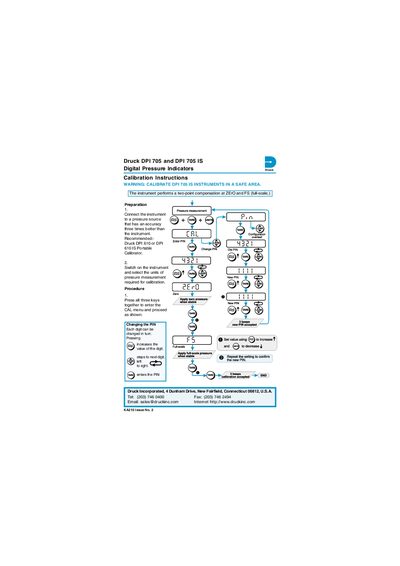
These instructions describe how to calibrate and configure the Druck DPI 705 and DPI 705 IS digital pressure indicators. Preparation includes connecting the instrument to a pressure source with three‑times better accuracy and using a recommended Druck DPI 610 or DPI 610 IS portable calibrator. Safety warning: calibrate DPI 705 IS instruments in a safe area.
The procedure starts by pressing all three keys together to enter the CAL menu, where the PIN can be changed digit by digit. The instrument performs a two‑point compensation at ZERO and full‑scale (FS). The instructions apply to instruments with software version 1.02 and later; future software changes may require updated procedures.
| Recommended calibrator | Druck DPI 610 or DPI 610 IS Portable Calibrator |
|---|---|
| Software version | 1.02 onwards |
The recommended calibrator is the Druck DPI 610 or DPI 610 IS portable calibrator.
Press all three keys together to enter the CAL menu, then use the increase key to change each digit of the PIN.
Calibrate DPI 705 IS instruments in a safe area.