
This Dell setup guide provides step‑by‑step instructions for connecting peripherals, powering on, and accessing support for a Dell computer.
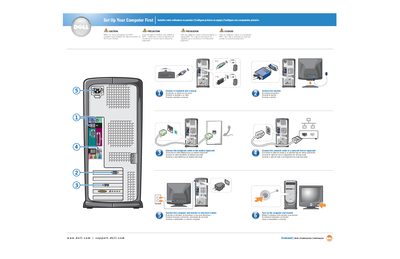
The guide walks you through the initial setup of a Dell computer, including safety precautions, connecting the monitor, keyboard, mouse, optional modem and network cables, and plugging the system into an electrical outlet. It also explains how to turn on the computer and monitor.
Additional information such as connecting a printer, accessing the Dell Solution Center, and using Windows XP help resources is provided, with references to the Owner's Manual for further details.
| USB 2.0 connectors | front/back |
|---|---|
| Headphone connector | front |
Connect the monitor to the computer as shown in the guide, then attach the power cable to an electrical outlet.
See your Owner's Manual for additional setup instructions, including how to connect a printer.
Double‑click the Dell Solution Center icon on the Windows desktop or visit support.dell.com.