
Comtrend PG-9172 G.hn Powerline Adapter Kit quick install guide for initial device setup, Ethernet connection, and secure network pairing.
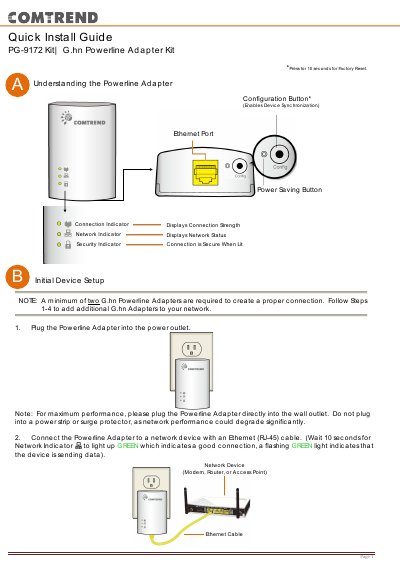
This quick install guide covers the Comtrend PG-9172 G.hn Powerline Adapter Kit. It explains initial device setup, including plugging the adapter into a wall outlet and connecting it to a network device with an Ethernet cable.
The guide also describes security setup using the Config button and states that up to 16 devices can connect to a Powerline G.hn network. Users are directed to the Comtrend website for advanced features and FAQ.
| Minimum adapters required | 2 |
|---|---|
| Maximum network devices | 16 |
| Factory reset | Press Configuration Button for 10 seconds |
A minimum of two G.hn Powerline Adapters are required to create a proper connection.
Up to 16 devices can be connected to a Powerline G.hn network.
Press the Configuration Button for 10 seconds to perform a factory reset.
Visit the Comtrend product webpage for instructions on advanced features and FAQ.