
Quick reference guide for Clearcom RS-702 and RS-703 dual-channel beltpacks, covering controls, LEDs, connectors, and DIP switch settings.
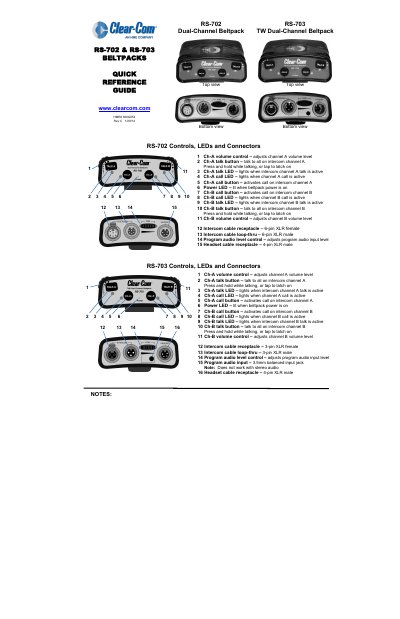
This guide provides a quick overview of the Clearcom RS-702 and RS-703 dual-channel beltpacks, detailing controls, LEDs, and connectors for channels A and B. It includes DIP switch settings for customizing audio and call behavior. The document also contains warranty, FCC, and WEEE compliance information.
The beltpack features volume controls, talk buttons, call buttons, and LED indicators for both channels. It supports 3.5mm balanced audio input and XLR connectors for intercom and headset. DIP switches allow configuration of mic type, headset output, and call behavior. This manual is written in Chinese.
| Headset Cable Receptacle | 4-pin XLR male |
|---|---|
| Program Audio Input | 3.5mm balanced input jack |
| Mic Type | Dynamic (default) or Electret |
| Headset Output Level | High (default) or Low |
Use the Ch-A volume control to adjust channel A volume level.
It allows you to talk to all on intercom channel A. Press and hold while talking, or tap to latch on.
Use DIP switch #1: ON = Dynamic, OFF = Electret.
Set DIP switch #2: ON = High, OFF = Low.