
Quick start guide for Cisco 8800 Series IP phones covering call handling, voicemail, and feature button usage.
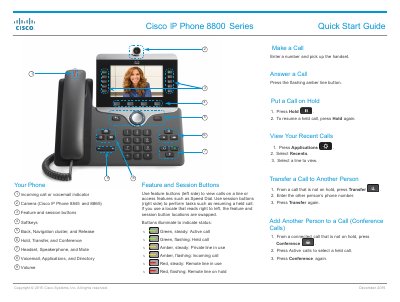
This guide provides step-by-step instructions for basic phone operations such as making and receiving calls, putting calls on hold, transferring, and initiating conference calls. It also covers configuring voicemail, adjusting settings like ringtone and brightness, and using feature buttons for speed dial and call control. The guide includes specific instructions for models 8845 and 8865, such as camera controls. This manual is written in Chinese.
Press the flashing amber line button.
Press Hold. To resume, press Hold again.
Press the Messages button, enter the default password (112233) followed by #, then follow the voice prompts to record your name and greeting, and set a new 6-digit password.
Press Applications, select Settings > Ringtone, choose a line, scroll through ringtones, press Play to hear a sample, then press Set and Apply to save.