
Quick start instructions for Cisco IP Phone 7800 Series Multiplatform Phones, covering basic calling, call management, and device settings.
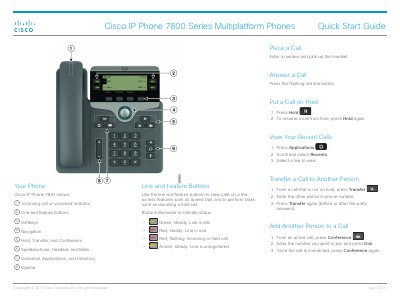
The Cisco IP Phone 7800 Series Multiplatform Phones Quick Start Guide provides essential operating instructions for the 7800 series, including the 7821, 7841, and 7861 models.
It details how to perform basic telephony tasks such as placing and answering calls, transferring calls, and managing conference calls, as well as adjusting device preferences like volume and screen contrast.
Press the Hold button to put a call on hold, and press Hold again to resume the call.
Go to Applications > User preferences > Screen preferences > Backlight timer and choose On, Off, or a specific time duration.