
Belkin INC006 Thunderbolt™ 4 Port HDMI® Dock Quick Setup Guide

Quick setup guide for Belkin's Thunderbolt™ 4 Port HDMI® Dock, detailing supported monitor resolutions.
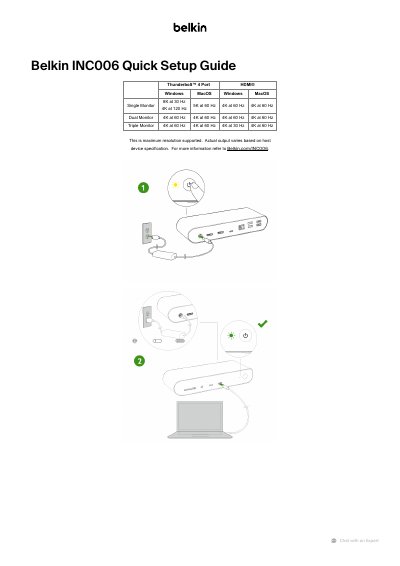

Belkin INC006 Thunderbolt™ 4 Port HDMI® Dock Quick Setup Guide - cover page
Brand
Belkin
Category
Adapter
Document type
Quick Start Guide
Language
English
Pages
2
File format
PDF
File size
214 KB
Published
04 November, 2026
Updated
04 November, 2026
MD5 checksum
1F00890E758892650EAF7C88830A5A2B

About this manual

This guide outlines maximum supported resolutions for single, dual, and triple monitor setups. It specifies 8K at 30 Hz, 4K at 120 Hz, 5K at 60 Hz, and 4K at 60 Hz for single monitors. Actual output may vary based on host device capabilities. For more details, visit Belkin.com/INC006.

What's inside

  • Supported Resolutions
  • Single Monitor Setup
  • Dual Monitor Setup
  • Triple Monitor Setup
  • Host Device Compatibility

Specifications

Maximum Resolution (Single Monitor)8K at 30 Hz, 4K at 120 Hz, 5K at 60 Hz, 4K at 60 Hz
Maximum Resolution (Dual Monitor)4K at 60 Hz

Frequently asked questions

What is the maximum resolution for a single monitor?

The maximum resolution for a single monitor is 8K at 30 Hz, 4K at 120 Hz, 5K at 60 Hz, and 4K at 60 Hz.

What is the maximum resolution for dual monitors?

The maximum resolution for dual monitors is 4K at 60 Hz.

Download PDF (214 KB)

More Belkin Manuals


View all Belkin manuals →