
Quick reference guide for the Avaya 9608 IP Phone covering calls, hold, transfer, conference, parking, contacts, and programming.
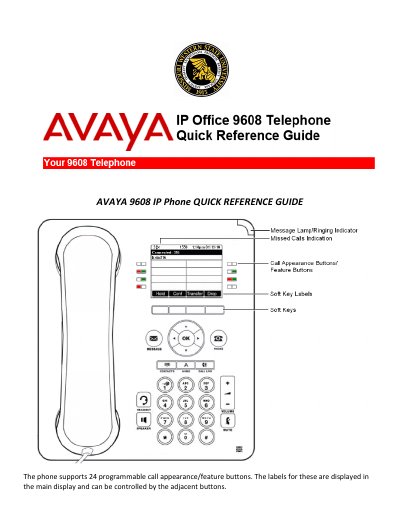
Avaya 9608 IP Phone Quick Reference Guide provides step-by-step instructions for common phone tasks. It covers making and answering calls, redial, volume, mute, hold, transfer, conference, call parking, do not disturb, forwarding, mobile twinning, contacts, call history, BLF and speed-dial programming, and ring sounds.
The guide also states that the phone supports 24 programmable call appearance/feature buttons and includes procedures for retrieving parked calls and programming blank feature buttons.
| Programmable call appearance/feature buttons | 24 |
|---|---|
| Personal contacts | 100 |
The phone supports 24 programmable call appearance/feature buttons.
Press mute to block the caller from hearing you; press mute again to remove the block.
Press the Hold key and hang up, then press the flashing line key to retrieve the call.
Press transfer, # and the mailbox number.