
Key facts
- Brand
- Avaya
- Model
- 9608
- Category
- Telephone
- Industry
- Electronics
- Documents
- 3
- Languages
- EN
- Last added
- 2026-11-16
Start here
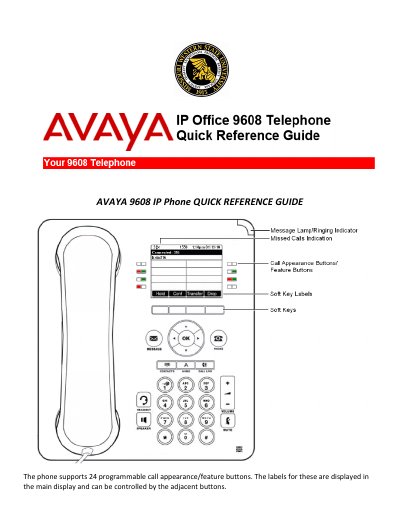
Avaya 9608 IP Phone Quick Reference Guide
Avaya 9608 IP Phone Quick Reference Guide provides step-by-step instructions for common phone tasks. It covers making and answering calls, redial, volume, mute, hold, transfer, conference, call parking, do not disturb, forwarding, mobile twinning, contacts, call history, BLF and speed-dial programming, and ring sounds.
The guide also states that the phone supports 24 programmable call appearance/feature buttons and includes procedures for retrieving parked calls and programming blank feature buttons.
Avaya 9608 specifications
| Gigabit Ethernet | Built‑in (model 9611G) |
|---|---|
| Display type | Color for 9611G, black‑and‑white for 9608 |
| Power over Ethernet warning | Must be connected to PoE networks without routing to the outside plant |
All Avaya 9608 documents by type
The shortest path to a working setup, usually only a few pages.
Day-to-day operation, settings and troubleshooting. Start here if the product is already set up.
Questions answered in these manuals
How many programmable call appearance/feature buttons does the Avaya 9608 IP Phone support?
The phone supports 24 programmable call appearance/feature buttons.
How do I mute a call on the Avaya 9608 IP Phone?
Press mute to block the caller from hearing you; press mute again to remove the block.
What does the "G" designation mean for the 9611G model?
It indicates the deskphone has a built‑in Gigabit Ethernet adapter for faster data transmission.
How many button modules can be attached to the deskphone?
Up to three button modules can be attached, and all must be the same type and model.
What is the difference between the 9608 and 9611G models?
The 9611G model has a color display and a built‑in Gigabit Ethernet adapter, while the 9608 model uses a black‑and‑white display and does not include a USB port.
How can I transfer contacts using a USB flash drive?
Insert a USB device (memory stick, thumb drive, or flash drive) into the phone’s USB port and follow the steps in the “Using USB Flash Drives with your phone” section.