
Step‑by‑step guide for configuring an email account on an iPhone.
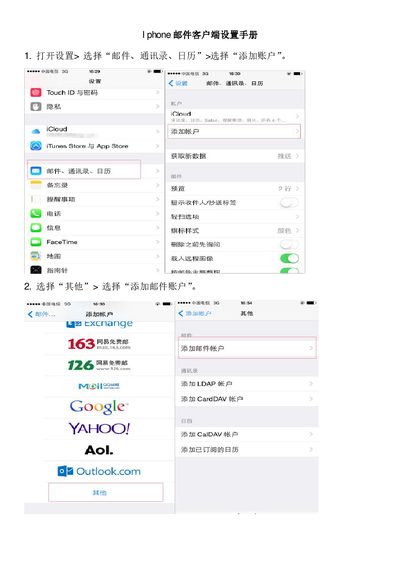
This manual shows how to add and configure an email account on an iPhone. It walks you through opening Settings, selecting Mail, Contacts, Calendars, and choosing Add Account.
You will learn how to enter account details, select the POP protocol, set incoming and outgoing server information, enable SSL if needed, verify the connection, and finish the setup so you can send and receive mail on your device. This manual is written in Chinese.
Open Settings, select “Mail, Contacts, Calendars”, then tap “Add Account”.
Select the POP protocol when configuring the account.
Tap “Done” to finish the setup; the iPhone will then be ready to send and receive mail.