
Step-by-step guide for configuring the Anybus X-Gateway Ethernet ports, EtherNet/IP scanner settings, Modbus-TCP I/O scanning, and PLC/PF6 Flex communication.
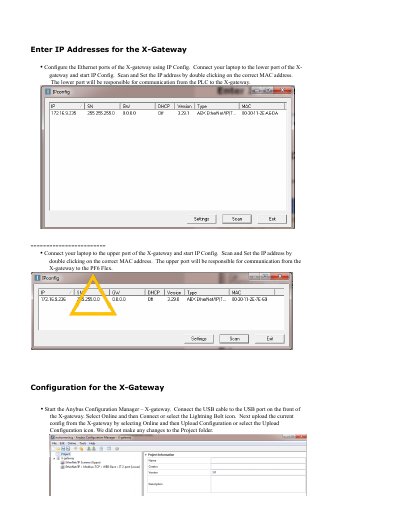
This guide explains how to set IP addresses for the two Ethernet ports of the Anybus X-Gateway using IP Config, then how to connect to the X-Gateway with Anybus Configuration Manager. It covers uploading and downloading the configuration and configuring the EtherNet/IP Scanner folders for the upper and lower ports.
The document also describes using the web interface for status checks and Scan List Config, entering PF6 Flex connection settings, and configuring Modbus-TCP communication in the PLC. It finishes with I/O scanning, creating input and output variables, and replacing logic in Map_Ethernet_Inputs and Map_Ethernet_Outputs.
| EtherNet/IP Scanner (Upper) input/output size | 56 and 80 bytes |
|---|---|
| EtherNet/IP Scanner (Lower) input/output size | 80 and 56 bytes |
| Modbus Address Mode | Disabled |
| PF6 Flex data rate | 10 ms |
| PF6 Flex connection points | 150 and 100 |
| RD length | 40 words |
| WR length | 28 words |
The lower port is used for communication from the PLC to the X-Gateway.
The upper port is used for communication from the X-Gateway to the PF6 Flex.
Scan List Config can only be updated when the X-Gateway is in Idle mode, set through Anybus Configuration Manager.
The data rate is 10 ms.