
This quick start guide covers charging, Bluetooth pairing, music control, and phone call operations for the Altec MZX009 R3VOLUTIONX headphones.
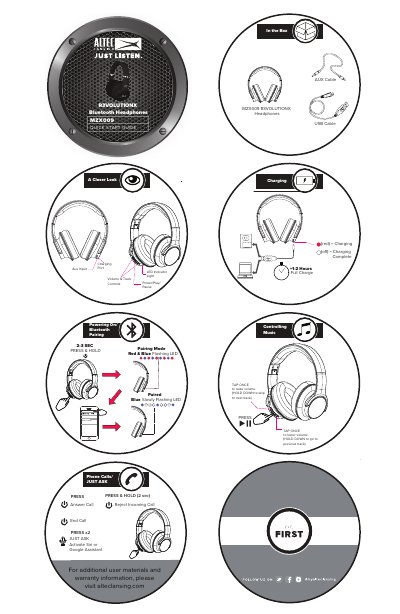
The Altec MZX009 R3VOLUTIONX headphones come with a USB cable and an AUX cable. The device features a charging port with an LED indicator that shows charging status (red light) or completion (off). A full charge takes approximately 1-2 hours.
Users can control music and calls using the touch controls on the earcup. Tapping once lowers the volume, while holding down skips to the previous track. Tapping once raises the volume, and holding down skips to the next track. The power button also handles play/pause, call answering, call ending, call rejection, and activating Siri or Google Assistant. This manual is written in Chinese.
A red light indicates the device is charging, while the light being off indicates charging is complete.
The box includes the MZX009 R3VOLUTIONX headphones, a USB cable, and an AUX cable.
A full charge takes approximately 1-2 hours.
The LED is red while charging and turns off when charging is complete.