
Aiphone GT-1C7 Tenant Station operation guide covering LCD brightness, volume, door release, camera, and talk controls.
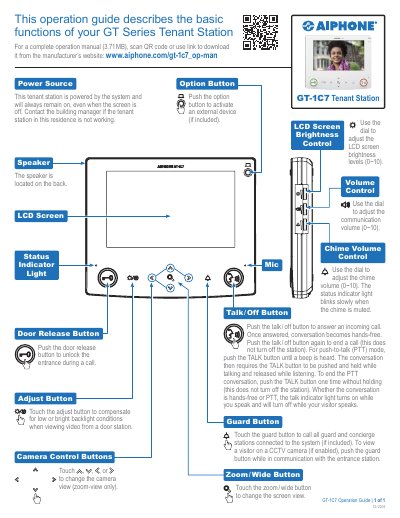
This one-page operation guide describes the basic functions of the Aiphone GT Series Tenant Station GT-1C7, including LCD screen brightness, communication and chime volume, door release, option, guard, adjust, zoom/wide, camera control, and talk/off button operation.
It also notes that the speaker is located on the back, that the station is powered by the system, and that a complete operation manual is available through the manufacturer's website link.
| LCD screen brightness levels | 0-10 |
|---|---|
| Communication volume levels | 0-10 |
| Chime volume levels | 0-10 |
| Power source | Powered by the system |
| Speaker location | On the back |
Use the dial to adjust the LCD screen brightness levels from 0 to 10.
Push the talk / off button again to end the call.
The speaker is located on the back.
Contact the building manager if the tenant station in this residence is not working.