
Brief guide for connecting, programming, and operating the Aiphone AXW-AZ video door station.
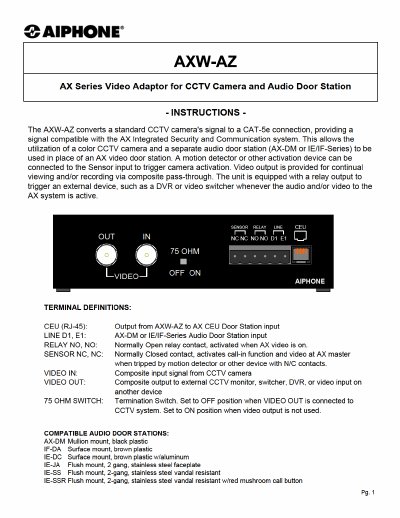
The Aiphone AXW-AZ is a video door station that integrates with the AX system. This guide provides essential information for connecting the unit, basic programming steps, and operational features.
Key topics include specifications, wiring distances, power requirements, and how to configure the station number in the AX setup utility. For full installation details, refer to the complete AX Installation Manual on the CD provided with the AX CEU.
| Power | Supplied by AX CEU |
|---|---|
| Video Input & Output | Composite 1V Peak-to-Peak, NTSC |
| Connector | BNC |
| Audio Door input | Use AX-DM or any IE/IF-Series Audio Door Station |
| Relay | Normally Open contact output, 24V DC, 1A |
| Sensor | Normally Closed contact input |
| Wire | CAT-5e, 24AWG UTP-4 |
| Wiring distance with Door | Max. 980' from AX-DM / IE/IF-series door to AX CEU (through AXW-AZ) |
| Wiring distance without Door | Max 980' from AXW-AZ to AX CEU |
| Dimensions | 1-5/8"H x 7"W x 4"D |
The AXW-AZ is powered by the AX CEU.
Set the station number corresponding to the AXW-AZ to “Video” in the AX setup utility.