
Aiphone JF-DA/DV/DVF camera door stations with color video, audio intercom, and 2-way hands-free communication.
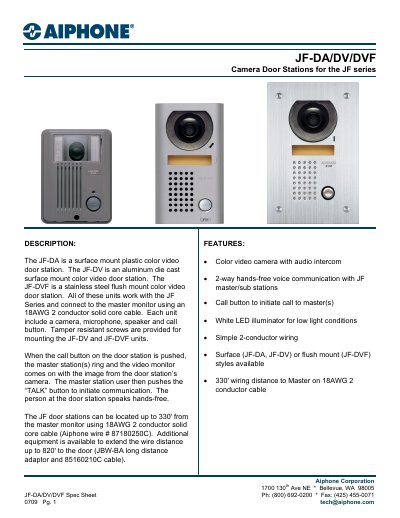
The JF-DA, JF-DV, and JF-DVF are camera door stations for the JF series, each with a color video camera, microphone, speaker, and call button. They support 2-way hands-free voice communication and include a white LED illuminator for low light. Units are available in plastic, aluminum, or stainless steel with surface or flush mount options. They connect to the master monitor via 18AWG 2-conductor cable, with up to 330' range using standard cable or up to 820' with optional extenders. Each unit is designed for specific mounting styles and materials, with dimensions and weights listed. Features include tamper-resistant screws for JF-DV and JF-DVF, and auto-voice actuated or PTT communication control by the master station.
| Power Source | 18V DC |
|---|---|
| Camera | ¼” color CCD |
| Scanning lines | 525 lines |
| Min. illumination | 5 Lux at 1' |
| Wiring | 2-conductor, PE insulation, Aiphone wire #871802 |
| Wiring Distance | Door to master, 330' |
| Operating Temp | 14 – 140° F (-10 ~ 60° C) |
| Dimensions (HxWxD) - JF-DA | 5-1/8" x 3-7/8" x 1-9/16" (131 x 99 x 40 mm) |
| Weight - JF-DA | 0.46lbs (210g) |
| Back box weight | 0.95lbs (430g) |
JF-DA is plastic, JF-DV is aluminum die cast, and JF-DVF is stainless steel.
¼” color CCD with 525 scanning lines.
5 Lux at 1' distance.