
This document introduces the features and functions of the digital clamp meters KEW-2040 and KEW-2055. These clamp meters comply with international safety specifications and have comfortable grip, data hold function, LCD backlight function (only for KEW-2055), REL function, MIN/MAX function, continuity/diode test function, NCV (non-contact voltage) detection function, etc. At the same time, these clamp meters have 600V input protection, automatic power off function, and bar graph display.
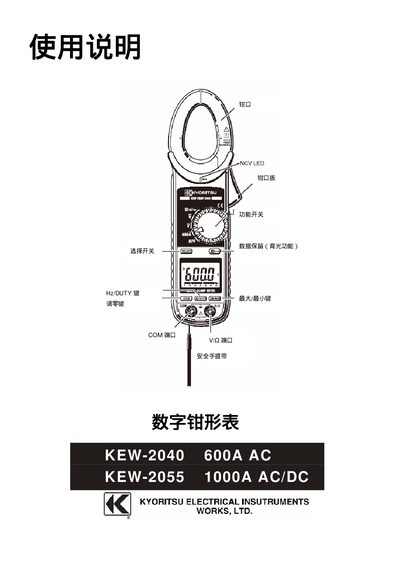
This manual provides safety warnings, specifications, and step‑by‑step instructions for using the KEW‑2040 and KEW‑2055 clamp meters. It explains how to select measurement modes, connect test leads, and interpret the LCD display for current, voltage, resistance, continuity, diode, and frequency measurements.
Additional sections describe battery replacement, automatic shut‑off, backlight control, NCV (non‑contact voltage) detection, and routine cleaning. Contact information for the manufacturer and accessories included with the meters are also listed. This manual is written in Chinese.
| AC Current Range (KEW‑2040) | 0 ~ 600 A |
|---|---|
| AC Current Range (KEW‑2055) | 600 ~ 1000 A |
| AC Voltage Range | 1 ~ 600 V |
| DC Voltage Range | 0 ~ 600 V |
| Resistance Range | 600 Ω ~ 60 MΩ |
| Current Accuracy (KEW‑2040) | ±1.5 % + 5 digits (50/60 Hz) |
| Current Accuracy (KEW‑2055) | ±1.5 % + 5 digits (50/60 Hz) |
Press and hold the HOLD key for more than 2 seconds to toggle the backlight; press again for the same duration to turn it off.
When the NCV sensor detects an electric field above 100 V, a red LED lights up on the panel to indicate the presence of voltage without contacting the circuit.
The instrument complies with IEC 61010‑1 safety standards and is rated CAT IV 600 V.