
This document provides a quick installation guide for the DCP-145C, DCP-165C, and DCP-185C printers. The document includes steps for installing ink cartridges, adjusting LCD contrast, setting date and time, and installing paper.
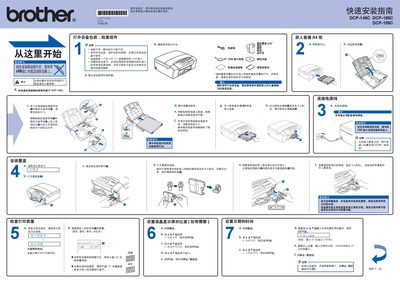
This guide walks you through unpacking the printer, checking that all components are present, loading A4 paper, installing ink cartridges and connecting the power and USB cables. It also explains how to prepare the device for first use, including initial cleaning of the ink system.
The document then details software installation on Windows or macOS, using the supplied CD‑ROM to install the MFL‑Pro Suite and optional applications, and shows how to set the date, time and perform a test print to verify proper operation. This manual is written in Chinese.
| Supported paper size | A4 |
|---|---|
| Ink cartridge capacity | ≈65 % of market cartridge capacity |
| Interface | USB |
| Power requirement | Grounded outlet required |
Open the paper tray, adjust the guides to A4 size, place ordinary A4 paper inside, and close the tray.