
Quick guide for the Konica Minolta magicolor 2480 MF printer, covering function keys, error LEDs, display keys, copy settings, and consumable replacement.
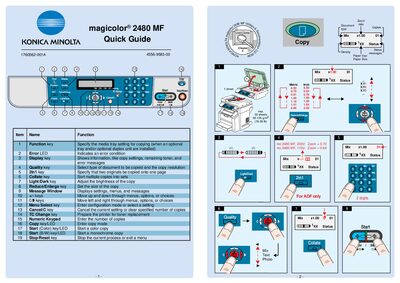
This Quick Guide provides concise instructions for operating the Konica Minolta magicolor 2480 MF multifunction printer. It explains the purpose of each function key, error LED, and display key, as well as how to adjust copy settings such as quality, collate, and zoom.
The guide also details the steps for replacing consumables, including toner and drum cartridges, and includes notes on scanning and paper handling. It is intended for users who need fast reference information without a full manual.
| Paper capacity | max. 50 sheets |
|---|---|
| Paper weight | 60-135 g/m2 (16-36 lb) |
| Zoom ratio (230 V) | 0.70 |
| Zoom ratio (110 V) | 0.64 |
The error LED indicates an error condition.
Press the Start (Color) key/LED to begin a color copy.