
This guide describes how to quickly get started with your Dell computer.
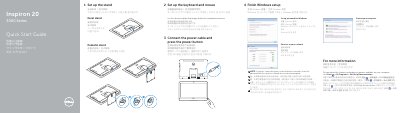
This Quick Start Guide from Dell walks new owners of the Inspiron 20 3000 Series computer (model Inspiron 20-3052) through the first steps after unboxing. It explains how to set up either the easel stand or the pedestal stand, protect the computer, set up the keyboard and mouse, connect the power cable and press the power button.
It then covers finishing Windows setup, setting a Windows password, and connecting to a network, noting that a password must be entered when joining a secured wireless network. The guide also identifies the computer's features, including cameras, microphones, media-card reader, USB 3.0 and USB 2.0 ports, headset and audio-out ports, network port, power-adapter port, screen-off and brightness buttons, and an optional optical drive, plus tilt ranges for both stand types. Support links point to dell.com/support and dell.com/support/manuals.
| USB 3.0 ports | 2 |
|---|---|
| USB 2.0 ports | 2 |
| Optical drive | Optional |
| Tilt range (easel stand) | 12.5°–40° |
| Tilt range (pedestal stand) | 5° / 30° |
Yes. When connecting to a secured wireless network, enter the password for wireless network access when prompted.
Click Start → All Programs → Dell Help Documentation on the computer.
Dell provides product support and manuals at dell.com/support and dell.com/support/manuals.