
Dell Precision Rack 7910 Quick Start Guide introduces the features and characteristics of the product.
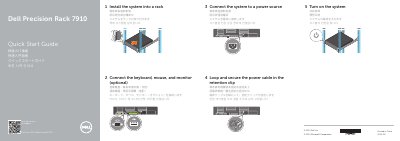
This Dell Precision Rack 7910 Quick Start Guide provides setup instructions for the Dell Precision Rack 7910 computer. It covers installing the system into a rack, connecting the keyboard, mouse, and monitor, connecting the system to a power source, securing the power cable, and turning on the system.
The guide identifies front and rear panel components such as the power button, NMI button, system identification button, VGA connectors, LCD panel, hard drives, USB ports, PCIe expansion card slots, serial connector, network connectors, and power supply. It lists the regulatory model E31S, regulatory type E31S001, and computer model Dell Precision Rack 7910.
Yes, the optical drive is optional.
Install the system into a rack, connect the keyboard, mouse, and monitor if needed, connect the system to a power source, secure the power cable in the retention clip, and turn on the system.
The guide lists connecting the keyboard, mouse, and monitor as optional.
Loop and secure the power cable in the retention clip.