
The Dell™ W3201C 32-inch LCD TV is a high-performance television with the following features:
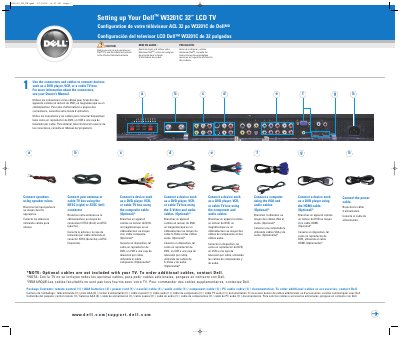
This two-page setup sheet from Dell shows how to set up the Dell W3201C 32-inch LCD TV. It walks through connecting the power cable, attaching devices such as a DVD player, VCR or cable TV box with composite, S-Video, component and HDMI cables, connecting an antenna or cable TV box to the NTSC or ATSC connector, connecting a computer with VGA and audio cables, and connecting speakers with speaker wires.
The guide then covers installing the AAA batteries in the remote control, turning the TV on, and choosing the correct input source on the remote or the TV, listing the source names for each connector. It also explains how to preset viewable channels through the Main Menu under Setup, Channel Setup and Channel Search, and lists the package contents. Optional cables are noted as not included with the TV.
| Screen size | 32 inches |
|---|---|
| HDMI inputs | HDMI 1 and HDMI 2 |
| TV tuner inputs | NTSC (right) and ATSC (left) connectors |
| Input sources | VGA, HDMI 1, HDMI 2, TV, DIGITAL TV, AV1-AV6, AV SIDE (Composite 3), AV SIDE (S-Video 3) |
| Included accessories | Remote control (1), AAA batteries (3), power cord (1), coaxial cable (1), audio cable (1), component cable (1), PC audio cable (1), documentation |
| Remote control batteries | 3 x AAA |
Go to the Main Menu, select Setup, select Channel Setup, and then select Channel Search. If you use both the NTSC and ATSC connectors, you need to preset channels for both the TV and Digital TV input sources.
The package contains a remote control, three AAA batteries, a power cord, a coaxial cable, an audio cable, a component cable, a PC audio cable and documentation.
Select HDMI 1 or HDMI 2 depending on which HDMI connector you used on the TV.
No, optional cables are not included with the TV; you can contact Dell to order additional cables or accessories.