
The Dell™ SP2009W flat panel monitor is a 20-inch widescreen LCD monitor with a resolution of 1680 x 1050 and a 5 millisecond response time. It also has multiple connectivity options, including VGA, DVI, and DisplayPort.
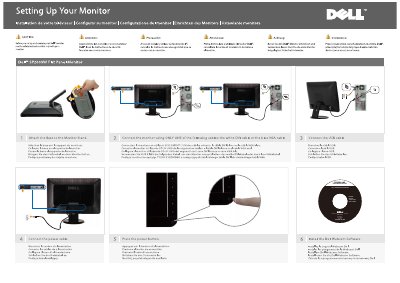
The document is a setup guide for the Dell SP2009W Flat Panel Monitor. It gives step-by-step instructions for attaching the base to the monitor stand, connecting the monitor with either the white DVI cable or the blue VGA cable, connecting the USB cable, connecting power, and pressing the power button.
It also covers installing Dell Webcam Software and identifies monitor features including the power button, function keys, webcam, MIC, and cable management slot. A Finding Information section points to the User's Guide on the Drivers and Documentation media.
| Video connection | DVI or VGA, using only one cable |
|---|---|
| USB connection | USB cable |
Use only one of the video cables: the white DVI cable or the blue VGA cable.
Press the power button.
The guide includes installing Dell Webcam Software.
See the User's Guide on the Drivers and Documentation media.