
The Dell computer user manual introduces the safety, features and functions of the Dell computer.
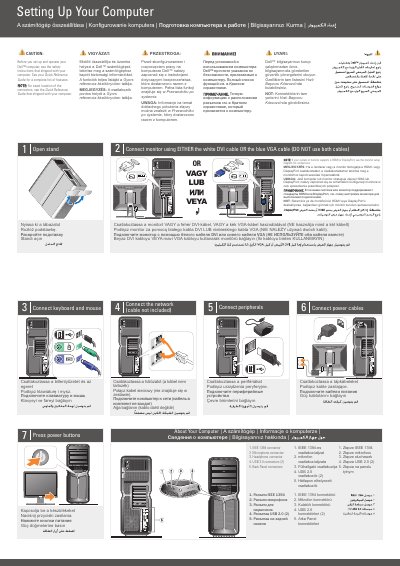
This two-page Dell setup document covers the initial hardware setup of a Dell XPS 730/730X computer. It walks through opening the stand, connecting the monitor with either the white DVI cable or the blue VGA cable, connecting the keyboard and mouse, the network cable, peripherals and the power cables, and pressing the power buttons. Setup text is printed in English, Hungarian, Polish, Russian and Turkish.
The document also describes the computer's connectors (IEEE 1394, microphone, headphone, two USB 2.0 and back panel connectors) and shows an optional wireless network arrangement with an Internet service, a cable or DSL modem, a wireless router and desktop computers with a network adapter or USB wireless adapter. It directs readers to the Quick Reference Guide or support.dell.com for more information.
| IEEE 1394 connector | 1 |
|---|---|
| Microphone connector | 1 |
| Headphone connector | 1 |
| USB 2.0 connectors | 2 |
| Back panel connectors | Provided |
Use either the white DVI cable or the blue VGA cable, but do not use both cables at the same time.
See the Quick Reference Guide; if you do not have a printed copy, go to support.dell.com.
The document lists an IEEE 1394 connector, a microphone connector, a headphone connector, two USB 2.0 connectors and back panel connectors.
No, the setup steps state that the network cable is not included.