
Dell E-Port II Quick Setup Guide

The Dell™ E-Port II User’s Guide provides information on how to set up and use the Dell™ E-Port II.
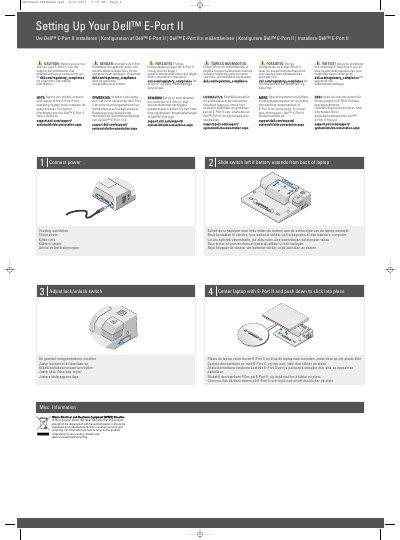

Dell E-Port II Quick Setup Guide - cover page
Brand
DELL
Category
Other Computer Accessories
Document type
User Manual
Language
English
Pages
2
File format
PDF
File size
509 KB
Published
25 November, 2023
Updated
25 November, 2023
MD5 checksum
C178FEF7DA45592E9882F9922C1C267F

About this manual

This document serves as a quick setup guide for the Dell E-Port II docking station. It includes safety cautions regarding regulatory compliance and initial OS setup before connecting the device. The guide provides multilingual instructions on how to connect the power adapter and physically dock the laptop by centering it and pushing down until it clicks into place.

What's inside

  • Setting Up Your Dell E-Port II
  • Connect power
  • Center laptop with E-Port II
  • Adjust lock/unlock switch
  • About Your Dell E-Port II
  • WEEE Directive

Frequently asked questions

What must happen before you first connect your laptop to the E-Port II?

The operating system must complete its setup process before the laptop is initially connected to the E-Port II.

What should you do if the battery extends from the back of the laptop?

Slide the switch to the left if the battery extends from the back of the laptop.

How should you place the laptop on the E-Port II?

Center the laptop with the E-Port II and push it down until it clicks into place.

Download PDF (509 KB)

More DELL Manuals


View all DELL manuals →