
Manual for Dell computer
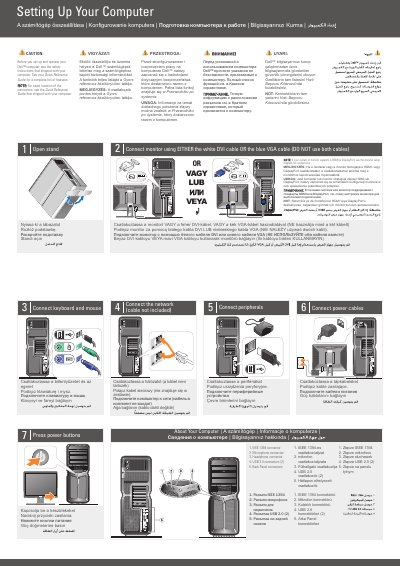
This two-page multilingual setup guide for the Dell XPS 730/730X shows how to set up the computer. It begins with a caution to read the safety instructions shipped with the computer and refers to the Quick Reference Guide for the feature list and connector locations.
The guide provides numbered connection steps for opening the stand, connecting a monitor with either DVI or VGA, connecting keyboard and mouse, network, peripherals, and power cables, and pressing the power buttons. It also identifies back panel connectors and includes an optional wireless network diagram and a Finding Answers section pointing to the Quick Reference Guide and support.dell.com.
| IEEE 1394 connector | 1 |
|---|---|
| Microphone connector | 1 |
| Headphone connector | 1 |
| USB 2.0 connectors | 2 |
| Monitor connection | White DVI cable or blue VGA cable (not both) |
Read the safety instructions that shipped with the computer, and see the Quick Reference Guide for the full feature list.
Use either the white DVI cable or the blue VGA cable, but do not use both.
See the Quick Reference Guide, or go to support.dell.com if you do not have a printed copy.