
Dell Vostro Computer Quick Start Guide

The document provides instructions on how to use a Dell computer.
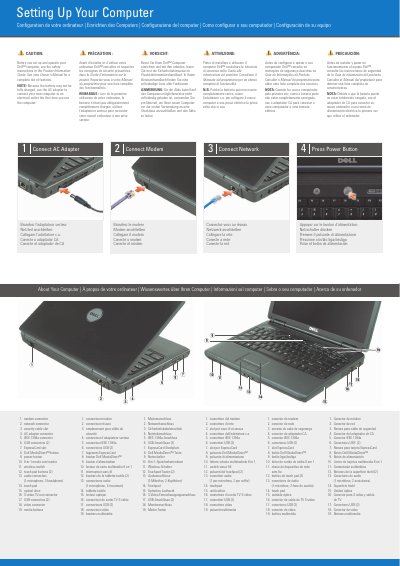

Dell Vostro Computer Quick Start Guide - cover page
Brand
DELL
Category
Laptops
Document type
User Manual
Language
English
Pages
2
File format
PDF
File size
294 KB
Published
25 November, 2023
Updated
25 November, 2023
MD5 checksum
AB0309F4A61221BE845910D0B1CCC65B

About this manual

This document serves as a quick start guide for Dell Vostro computers, providing essential safety warnings and initial setup instructions. It advises users to consult the Product Information Guide for safety details and the Owner's Manual for a complete feature list before operating the device. A specific note highlights that the battery may not be fully charged upon purchase, recommending the use of the AC adapter for the first connection to an electrical outlet.

What's inside

  • Safety Instructions
  • Setting Up Your Computer
  • Connect Modem
  • Connect Network
  • Press Power Button
  • Wireless Network Setup

Frequently asked questions

What should I use to connect the computer to an electrical outlet the first time I use it?

Use the AC adapter, because the battery may not be fully charged.

What should I read before I set up and operate the computer?

See the safety instructions in the Product Information Guide.

Where can I find more information about using the computer?

See your Owner's Manual for more information about using your computer.

Download PDF (294 KB)

More DELL Manuals


View all DELL manuals →