
The Dell™ 3400MP Projector is a portable projector that features:
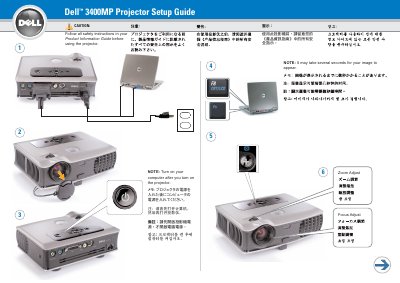
The Dell 3400MP Projector Setup Guide provides a short setup procedure for connecting the projector, adjusting focus and zoom, and turning on the computer after the projector. It also lists the buttons on the remote control and notes that the USB cable must be connected to use the Next Page and Previous Page functions.
The guide directs users to follow the safety instructions in the Product Information Guide before using the projector and to see the Owner's Manual for more information. It is dated June 2005 and printed in Taiwan.
| Projector model | 3400MP |
|---|---|
| Document date | June 2005 |
| Document number | 0M8605A00 |
Follow all safety instructions in the Product Information Guide before using the projector.
Turn on the computer after you turn on the projector.
Yes. The USB cable must be connected to use Next Page and Previous Page on the remote control.
See the Owner's Manual for more information about the projector.