
OptiPlex 5055 Small Form Factor Quick Start Guide
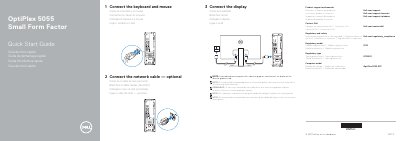
This two-page Dell quick start guide shows how to set up the OptiPlex 5055 Small Form Factor: connect the keyboard and mouse, optionally connect the network cable, connect the display, then connect the power cable and press the power button. A note explains that if the computer was ordered with a discrete graphics card, the display should be connected to that card. The instructions are repeated in English, Spanish, French, Italian, and Portuguese.
The guide also provides numbered feature callouts for the computer, including the optical drive, USB 2.0 and USB 3.1 Gen 1 ports, DisplayPorts, optional VGA port, network port, PS/2 ports, expansion card slots, power supply diagnostic light, and security cable slots. It lists Dell support and regulatory web addresses and shows the regulatory model D11S and regulatory type D11S003.
| Computer model | OptiPlex 5055 SFF |
|---|---|
| Optical drive | Optional |
| USB 3.1 ports | USB 3.1 Gen 1 ports |
| USB 2.0 ports | USB 2.0 ports (supports Smart Power on) |
| VGA port | Optional |
| Memory card reader | Optional |
| Security cable slot | Kensington security cable slot |
Connect the display to the discrete graphics card.
No; the guide labels the network cable connection as optional.
Dell lists Dell.com/support, Dell.com/support/manuals, and Dell.com/support/windows.
The computer model is OptiPlex 5055 SFF.