
Dell OptiPlex 7050 Tower Quick Start Guide

OptiPlex 7050 Tower Quick Start Guide
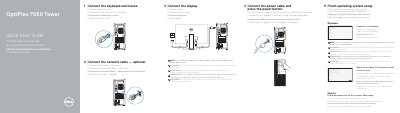

Dell OptiPlex 7050 Tower Quick Start Guide - cover page
Brand
DELL
Category
Desktops
Document type
Quick Start Guide
Language
English
Pages
2
File format
PDF
File size
615 KB
Published
25 November, 2023
Updated
25 November, 2023
MD5 checksum
D63DCF233267E1D7B1E4657CB45264B0

About this manual

This document is a Quick Start Guide for the Dell OptiPlex 7050 Tower. It provides multilingual instructions for connecting essential peripherals such as the keyboard, mouse, network cable, display, and power cable. It also outlines the initial steps for setting up the operating system, including Windows, Ubuntu, and Microsoft account sign-in.

What's inside

  • Connect the keyboard and mouse
  • Connect the network cable
  • Connect the display
  • Connect the power cable
  • Finish operating system setup
  • Locate Dell apps
  • Features
  • Product support and manuals
  • Regulatory and safety

Frequently asked questions

Where can I find Dell support and manuals?

You can find support and manuals at Dell.com/support or Dell.com/support/manuals.

What should I do if I ordered the computer with a discrete graphics card?

You should connect the display to the discrete graphics card instead of the standard port.

Download PDF (615 KB)

More DELL Manuals


View all DELL manuals →